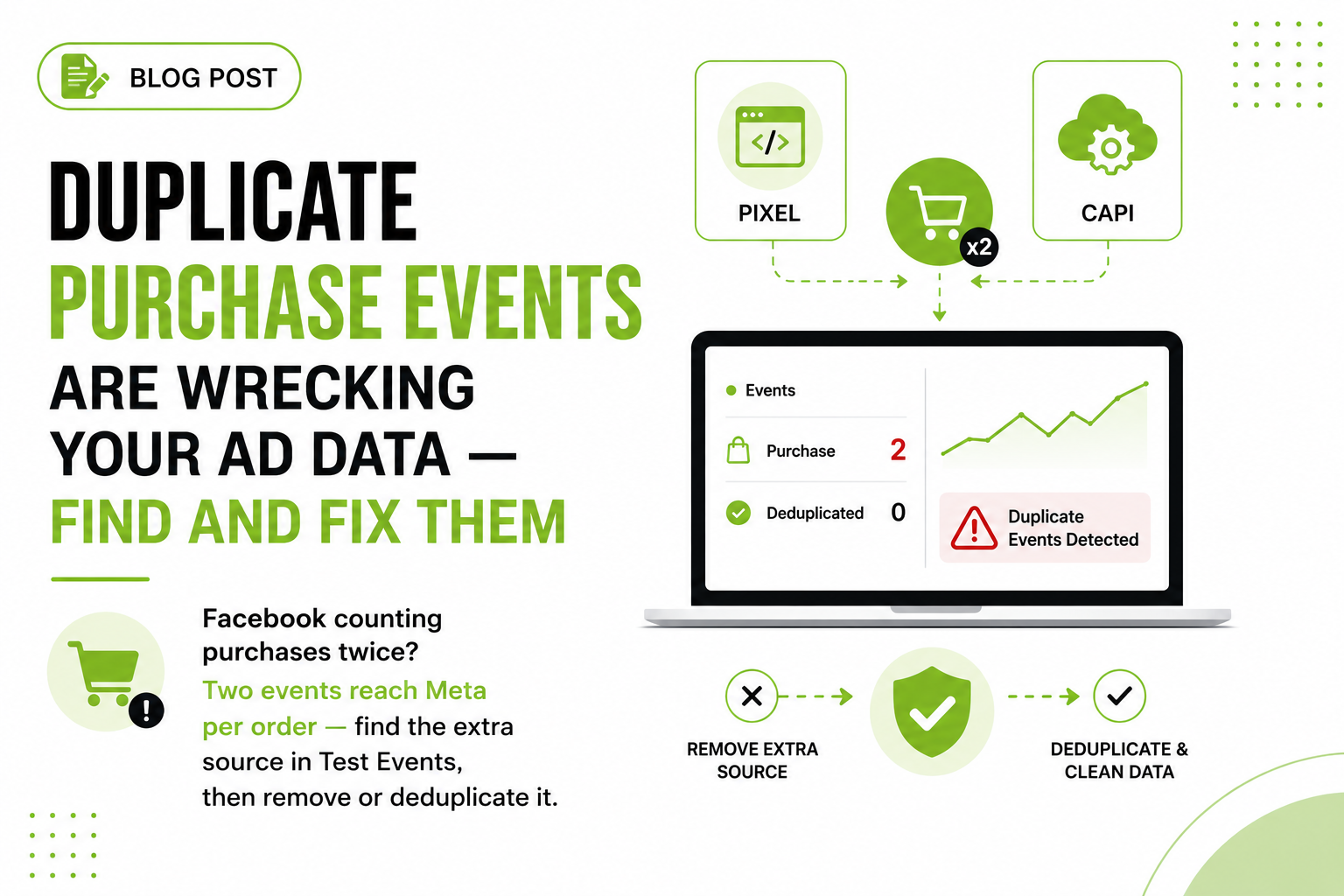
A store owner showed me their Events Manager last month: 214 purchases for the week. Shopify admin said 108. That near-exact 2x is the tell. Random tracking bugs produce random numbers. Duplicates produce multiples.
Why does duplicate purchase data hurt so much?
Because Meta's bidding optimizes toward whatever your pixel reports. First you get flattering dashboards: inflated ROAS, cost-per-purchase at half of reality. Then value-based lookalikes get built from doubled order values, automated rules scale losing campaigns, and people push budget 3x on Meta's numbers only to learn at month end that the bank account disagrees.
The check takes five minutes: pull Purchase counts in Events Manager for the last 7 days, pull paid orders from your store admin, and divide. Small variance from timezones, refunds, and attribution timing is normal. A ratio of 1.8x to 2.2x is duplication, not attribution.

| Layer | What sits there |
|---|---|
| Inputs | fbq base code in theme.liquid, Facebook & Instagram app, Meta pixel tag in GTM, Conversions API, its own event ID |
| Meta Events Manager | Nothing shares an event_id, so no pair deduplicates and every source is counted |
| Destinations | 214 Purchase events reported, 108 real paid orders, ROAS inflated, CPA halved, Lookalikes on doubled values |
Is your pixel installed twice?
This is the most common cause I find. Someone pasted the pixel base code into the theme years ago, an app added it again, an agency added a third copy through GTM. Three installs, three purchases per order.
On Shopify, check these places:
- The native Facebook & Instagram app (Settings → Apps and sales channels). A pixel connected there fires standard events automatically.
- theme.liquid and any thank-you page customizations. Search the theme for
fbqorconnect.facebook.net. - GTM, if you run it. Look for a Meta pixel tag or a custom HTML tag with the base code.
- Other apps. Landing page builders and "conversion booster" apps sometimes inject pixels of their own.
WooCommerce gets the same disease: theme code plus a pixel plugin plus GTM. ClickFunnels and GoHighLevel users often have the pixel in funnel settings AND pasted on individual pages. Every install fires independently.
The fix: pick one install and delete the rest. Not pause. Delete. Keep whichever is easiest to maintain (native integration or GTM) and rip the hardcoded copies out of the theme.
Is a platform integration and your custom pixel both firing?
Yes, if you set up a native integration and never removed your manual setup. Sneakier than a double install, because the sources don't look alike: Shopify's Facebook app sends events one way, your GTM tag another. Both are "correct" alone. Together they double everything. Same collision with automatic CAPI apps running next to GTM.
The fix: decide which integration owns Purchase and stop the other from sending it. Some platforms let you keep catalog sync while turning off event sending; if yours doesn't, keep the one with better data quality and kill the other.

- Order 84921 completes — One order, one ID minted from the order
- Browser pixel — fbq Purchase with eventID: order_84921
- Server CAPI — event_name Purchase, event_id order_84921
- Meta deduplicates — Same name and ID: keeps one, drops the other
Are browser and server events missing a matching event_id?
Running the pixel plus the Conversions API? Meta deduplicates the pair only when both events match on event_name and event_id. Same name, same ID, close together: Meta keeps one, drops the other. Miss the match and it counts both. Not a bug. That's the contract.
The most common failure: the browser pixel generates one random event ID and the server generates a different one. Or the server-side tag never maps the incoming eventID into the outgoing request. Or one side says Purchase and the other purchase. Case matters.
The browser side should look like this, with the same ID handed to both channels:
// Browser: pass an order-derived ID as eventID
fbq('track', 'Purchase', {
  value: 129.99,
  currency: 'USD'
}, { eventID: 'order_84921' });

// Server (CAPI payload): the SAME value in event_id
// "event_name": "Purchase", "event_id": "order_84921"
Use an order-derived value (order ID or number), not a random UUID generated separately on each side. That also protects against retries: the server fires twice, both carry the same event_id, Meta drops the second.
Does your thank-you page re-fire Purchase on refresh?
If Purchase fires on every load of the confirmation page, every refresh and bookmarked return fires it again. Customers revisit that page more than you'd think, to screenshot the order number or because their email links back to it.
Two layers of protection:
- Order-derived event_id. If every fire for order 84921 carries
event_id: 'order_84921', Meta's dedup absorbs repeat fires within its window. This is the strongest single fix on this whole page. - Fire-once logic. On Shopify, the Customer Events pixel framework fires
checkout_completedonce per checkout. On custom builds, set a localStorage flag keyed to the order ID and skip the fire if it's already set.
Are your upsells re-firing the full order value?
Post-purchase upsell flows (ClickFunnels, GoHighLevel, one-click upsell apps) are a special flavor of this. The main offer fires Purchase for $100. The customer accepts a $30 upsell, lands on a second confirmation page, and that page fires Purchase again, sometimes for the combined $130. Meta now shows $230 in revenue on a $130 order.
The fix: either fire one Purchase at the end of the funnel with the final total, or treat each accepted upsell as its own Purchase for the incremental value only ($30, not $130), each with its own event_id. Both are defensible. Overlapping totals are not. And check what your funnel platform's built-in pixel setting already sends before adding your own tracking on top.

- Open the Purchase event detail view — Events Manager shows which sources and connection methods send Purchase
- Place a real test order in Test Events — Two browser Purchases a second apart is a double install, live on screen. Refund it after.
- Run GTM Preview and Tag Assistant — Two facebook.com/tr requests with ev=Purchase in the network tab means two installs
- Cross-check GA4 DebugView — GA4 doubled too? The problem is upstream: a duplicated dataLayer push or a page firing twice
- One owner mints the event_id — Delete every other Purchase source, then recheck the Events Manager to backend ratio monthly
How do you diagnose which cause it is?
In this order, with a real test order, not assumptions.
- Events Manager, event detail view. Open the Purchase event and check which connection methods and sources send it. Two browser sources means a double install. Browser + server with near-zero deduplicated events means an event_id mismatch.
- Test Events with a real order. Open the Test Events tab and place a cheap real order (refund it after). You want exactly one Purchase per channel, with browser and server showing as deduplicated. Two browser Purchases a second apart is your double install, live on screen.
- Tag Assistant / GTM Preview. Preview mode shows every tag that fired on the confirmation page. Look for a Meta tag firing alongside pixel code loading outside GTM: two
facebook.com/trrequests withev=Purchasein the network tab = two installs. - GA4 DebugView for cross-checking. If GA4's
purchaseevent is also doubled, the problem is upstream of Meta: a duplicated dataLayer push or a page firing twice. GA4 shows one, Meta shows two? Meta-specific.
How do you keep duplicates from coming back?
One rule: every event gets one owner. One system decides when Purchase fires, generates the order-derived event_id, and hands it to both browser and server. Everything else that could send a Purchase gets removed, not paused.
Then write the dedup contract down: which system owns each event, the event_id format, and the rule that nobody adds a pixel, app, or integration without checking that doc first. Most duplicate disasters I've cleaned up started with someone helpful installing "just one more app." Recheck the Events Manager vs. backend ratio monthly; five minutes catches regressions before the algorithm eats weeks of bad data.
Does server-side tracking make duplicates better or worse?
Both, depending on who wires it. Add a server sender next to your pixel without a shared event_id scheme and you've built a duplicate factory — that's half the setups I audit. Done properly, it's the opposite: the server becomes the one place your event IDs get minted, deterministically, from the order number. The browser event and the server event can't drift apart when they're both stamped from the same source of truth.
And once that first-party server layer exists, it does more than deduplicate. Events fire from your own subdomain where blockers can't reach, carry hashed customer data that raises match quality, and keep flowing when a thank-you page fails to load. You stop trading one data problem for another — inflated counts for missing ones — and get a number that matches your backend. That's the standard worth building to.
Frequently asked questions
Why is Facebook Ads showing double the purchases my store actually had?
Two Purchase events are reaching Meta per order: the pixel installed in more than one place, a platform-native integration firing alongside your own setup, or pixel + Conversions API events missing a matching event_id.
How does Meta deduplicate pixel and Conversions API events?
Meta keeps one event and drops the other when a browser and server event share the same event_name and event_id and arrive close together in time. If either value differs, both count.
What should I use as the event_id for Purchase events?
Something derived from the order, like the order ID, sent identically from browser and server. Order-derived IDs also absorb page refreshes and server retries, which random UUIDs don't.
Does duplicate purchase data affect Meta's campaign optimization?
Yes. The bidding system optimizes toward reported purchases, so doubled events inflate ROAS, misprice cost caps, and train delivery toward audiences that convert half as well as reported.
How do I test whether my purchase deduplication is working?
Place a real test order with the Test Events tab open in Events Manager. You should see one browser Purchase and one server Purchase marked as deduplicated, and the Purchase event detail view reports deduplicated counts over time.
Do duplicate events on the thank-you page affect Google Analytics too?
Often, yes. A confirmation page that re-fires on refresh sends GA4 extras too. GA4 can dedupe purchases sharing a transaction_id, but the protection isn't airtight, so fix the firing logic at the source.