A form fill is not revenue. I've audited lead-gen accounts spending five figures a month where Smart Bidding was happily chasing people who fill out forms and never answer the phone. If your deals close on a call or after a quote, the fix is offline conversion tracking: feeding closed deals back to the platforms so the algorithms learn who actually buys.
Why is a form fill the wrong optimization target?
Because the platforms optimize toward whatever conversion you feed them, and form fills are cheap to generate. Smart Bidding doesn't know that the lead from Campaign A closed a $12,000 deal while the twenty leads from Campaign B were students, bots, and tire-kickers. All it sees is "conversion." So it buys more of whatever produces forms. Until you tell the platforms which leads became customers, they're optimizing blind — and they're very good at finding more of the wrong thing.

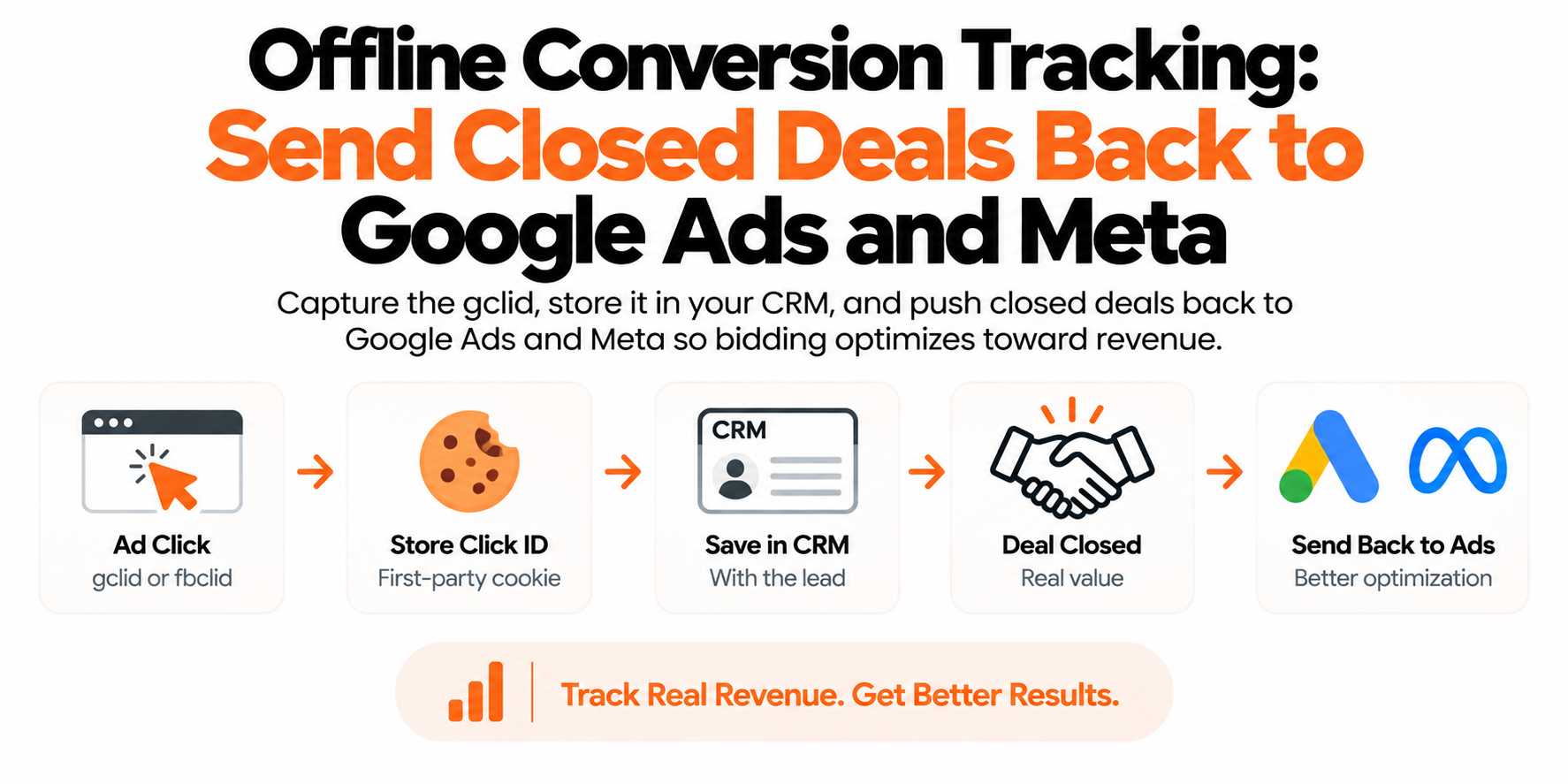
- Ad click lands — gclid, wbraid or fbclid arrives in the URL
- First-party cookie — Stored on your domain until the lead converts
- Hidden form field — Click ID rides into HubSpot or Salesforce
- Deal marked won — Close time and real deal value are known
- Uploaded back — Google Ads import and Meta CAPI learn who buys
How does offline conversion tracking work end to end?
Four steps, and the order matters:
- Capture the click ID. Google appends a
gclid(orwbraidon iOS traffic) to your landing URL; Meta appendsfbclid. Grab these the moment the visitor lands. - Store it first-party. Write the click ID into a cookie on your own domain so it survives until the visitor converts. This is the step almost everyone misses, and it's where most offline setups quietly die.
- Write it into the CRM with the lead. A hidden field on your form carries the click ID into HubSpot, Salesforce, GoHighLevel, Pipedrive — wherever the lead lives.
- Push closed deals back. When the deal is marked won, send the click ID (or the lead's email), close time, and deal value back to Google Ads and Meta, which match it to the original ad click.
How do I capture the gclid and store it so it doesn't disappear?
Read the URL parameters on landing and persist them in a first-party cookie. A minimal version:
// Grab ad click IDs from the URL and persist them
var params = new URLSearchParams(location.search);
['gclid', 'wbraid', 'fbclid'].forEach(function (key) {
  var val = params.get(key);
  if (val) {
    document.cookie = key + '=' + val +
      '; max-age=7776000; path=/; domain=.yourdomain.com; SameSite=Lax';
  }
});
Then map each cookie into a hidden field on every lead form so the value rides into the CRM at submit. Most form tools (Gravity Forms, HubSpot forms, GoHighLevel) support hidden fields without custom code.
Capture the lead's email and phone at form submit too — you'll want them for Enhanced Conversions for Leads and for Meta match quality.

| Offline import (gclid) | Enhanced Conv. for Leads |
|---|---|
| Deterministic when the gclid survives | Matches on the hashed lead email |
| Needs a cookie and a hidden field | No click ID to store or lose |
| ITP clips script cookies to 7 days | Match rates vary on Google's side |
| Upload inside the click-through window | Fastest setup if your CRM has emails |
How do I import offline conversions into Google Ads from my CRM?
Route 1: offline conversion import with the gclid
Create a conversion action in Google Ads with the source set to import from clicks, then upload rows containing the Google Click ID, conversion name, conversion time, value, and currency. Three ways in:
- Manual upload in the Google Ads UI — fine for testing, miserable as a routine.
- Scheduled Google Sheets import — your CRM writes closed deals into a sheet; Google Ads polls it on a schedule. Low-tech and surprisingly durable.
- Google Ads API — the proper automated path, pushing conversions the moment a deal is marked won.
The conversion time has to be after the click, and the upload has to land inside the conversion action's click-through window, extendable to 90 days. Sales cycle longer than that? Import an earlier milestone — qualified opportunity, proposal sent — instead of only the final close.
Route 2: Enhanced Conversions for Leads — often the pragmatic choice
Enhanced Conversions for Leads skips gclid plumbing entirely. The Google tag captures a hashed version of the lead's email at form submit; when the deal closes you upload the email plus conversion time and value, and Google matches it to the original ad click on its side.
Why I often recommend starting here: there's no click ID to lose. No cookie expiry, no hidden-field plumbing to break when someone redesigns the form. If your CRM stores the lead's email, you have everything you need. The trade-off: you depend on Google matching that email to a signed-in click, so match rates vary. I usually set up Enhanced Conversions for Leads first for speed, then add gclid import for coverage.
How do I send closed deals back to Meta?
Through the Conversions API — Meta folded its old standalone offline events tooling into datasets, so CAPI is now the one pipe. You send a server event (a custom event like DealClosed) with hashed customer information: email, phone, name, plus the _fbp and fbc values if you stored them at lead capture. More matched identifiers means higher Event Match Quality on Meta's 0–10 scale, and EMQ directly affects how many uploads Meta can attribute to an ad.
The catch for slow sales cycles: Meta rejects CAPI events whose event_time is more than 7 days old. You can't sit on a batch of closed deals for a month. Push deals within a day or two of closing, and send intermediate milestones — qualified lead, appointment held — so Meta gets signal while the big deals are still cooking.

| Native CRM integration | Zapier or Make | Server-side pipeline |
|---|---|---|
| Ships with HubSpot, Salesforce, GHL | Live this week, no developer needed | CRM webhook into a server container |
| Fine when pipeline stages are clean | Fails silently for weeks at a time | Retries, logs and deduplication |
| Little control over stage and value | You find out at quarterly reporting | One pipe feeding Google and Meta |
| Consistent values on both platforms |
What's the best way to automate the loop?
Manual CSV uploads die the first busy week. Three tiers:
| Option | Good fit | Weak spot |
|---|---|---|
| Native CRM integrations (HubSpot ↔ Google Ads, Salesforce sync, GoHighLevel) | Your CRM ships one and your pipeline stages are clean | Limited control over which stage fires and what value is sent |
| Zapier / Make | Small volume, no developer, need it live this week | Silent failures — nobody notices when a zap breaks for three weeks |
| Small server-side pipeline (CRM webhook into a server GTM container) | You want reliability, dedup, and both platforms fed from one place | Needs someone to build it once |
The server-side pipeline is the version I build for clients: retries on failure, logs you can check, one source of truth pushing to Google and Meta with consistent values and proper deduplication. The other two tiers work — until they don't, and you find out during quarterly reporting.
Do I need first-party server-side tracking for this to work?
You need it if you want the loop to hold together. Plain-language version: server-side tracking means your tracking data flows through a small server you control — a Google Tag Manager server container on your own subdomain, like track.yourdomain.com — instead of every browser talking directly to Google's and Meta's scripts. First-party means the cookies and requests belong to your domain, not a third party's.
For offline conversions, that changes three things. First, the click ID survives. Ad blockers strip tracking scripts before they ever read the URL, and Safari's ITP shreds JavaScript cookies within days — so the gclid is missing or expired for a meaningful slice of leads by the time they convert. A server-set first-party cookie doesn't get blocked and doesn't get the 7-day cap. Second, match quality goes up. The same pipeline captures _fbp, fbc, and hashed emails at lead capture, lifting Meta's Event Match Quality and letting Google match more Enhanced Conversions uploads — so the platforms optimize on more of your real closed deals, which is what brings CPAs down. Third, you get one pipe. Closed deals flow from the CRM through one server endpoint to Google and Meta with consistent values and dedup handled, and because you decide what the server shares, per consent, you stay compliant without going blind.
Without that foundation, offline tracking works for the leads whose click IDs happened to survive. With it, you're feeding the algorithms close to everything. In lead gen, that's usually the single biggest lever in the account.
What actually changes once the platforms see closed deals?
Smart Bidding stops optimizing toward form-fillers and starts optimizing toward closers. Bid on the imported closed-deal conversion (or run Maximize Conversion Value with real deal values), and Google starts finding people who resemble your buyers. Same on Meta: optimize toward the CAPI deal event once volume allows.
Expect a transition period. Closed deals are rarer than form fills, so bids can wobble for a few weeks. Keep the lead event as a secondary conversion, give the system a full sales cycle before judging, and resist flipping everything back the first slow week. Push through that window and cost per closed deal — the only number that matters — starts dropping.
Frequently asked questions
How do I import offline conversions into Google Ads from my CRM?
Capture the gclid in a first-party cookie, pass it into your CRM through a hidden form field, then upload the gclid with conversion time and value when the deal closes — via a scheduled Google Sheets import or the Google Ads API. Or use Enhanced Conversions for Leads, which needs only the email.
What's the difference between offline conversion import and Enhanced Conversions for Leads?
Import matches on the gclid you stored at lead capture; Enhanced Conversions for Leads matches on a hashed email, so there's no click ID to store or lose. Import is deterministic when the gclid survives; Enhanced Conversions for Leads is simpler and immune to cookie expiry.
How long do I have to upload an offline conversion to Google Ads?
The upload must land within the conversion action's click-through window, which you can set as long as 90 days after the click. For longer sales cycles, import an earlier pipeline milestone like a qualified opportunity.
Can I send offline conversions to Meta if I never captured the fbclid?
Yes. Meta matches Conversions API events on hashed customer information — email, phone, name — so a click ID isn't required. Including _fbp and fbc raises Event Match Quality, but email and phone alone match a solid share of deals.
What if my sales cycle is longer than 90 days?
Feed the platforms an earlier milestone that predicts revenue — qualified lead, demo held, proposal sent — and optimize toward that. Meta is stricter: CAPI events must arrive within 7 days of the event time, so milestones matter even more there.
Does offline conversion import work with wbraid and gbraid?
Yes. Google accepts wbraid and gbraid in offline conversion uploads the same way it accepts gclid; they're the privacy-preserving click identifiers issued on iOS traffic where gclid isn't available. Capture and store all of them at landing.