A client was convinced their Google Ads campaign was dead. Zero conversions in two weeks, 40+ leads in the inbox. The tracking was firing on a thank-you page that stopped existing when a developer switched the form to AJAX. The leads exist. The pixel just never hears about them.
Why is my form conversion not tracking in Google Ads or Facebook?
Because your trigger is watching for something that never happens. Almost every broken lead-gen setup I audit falls into one of four buckets:
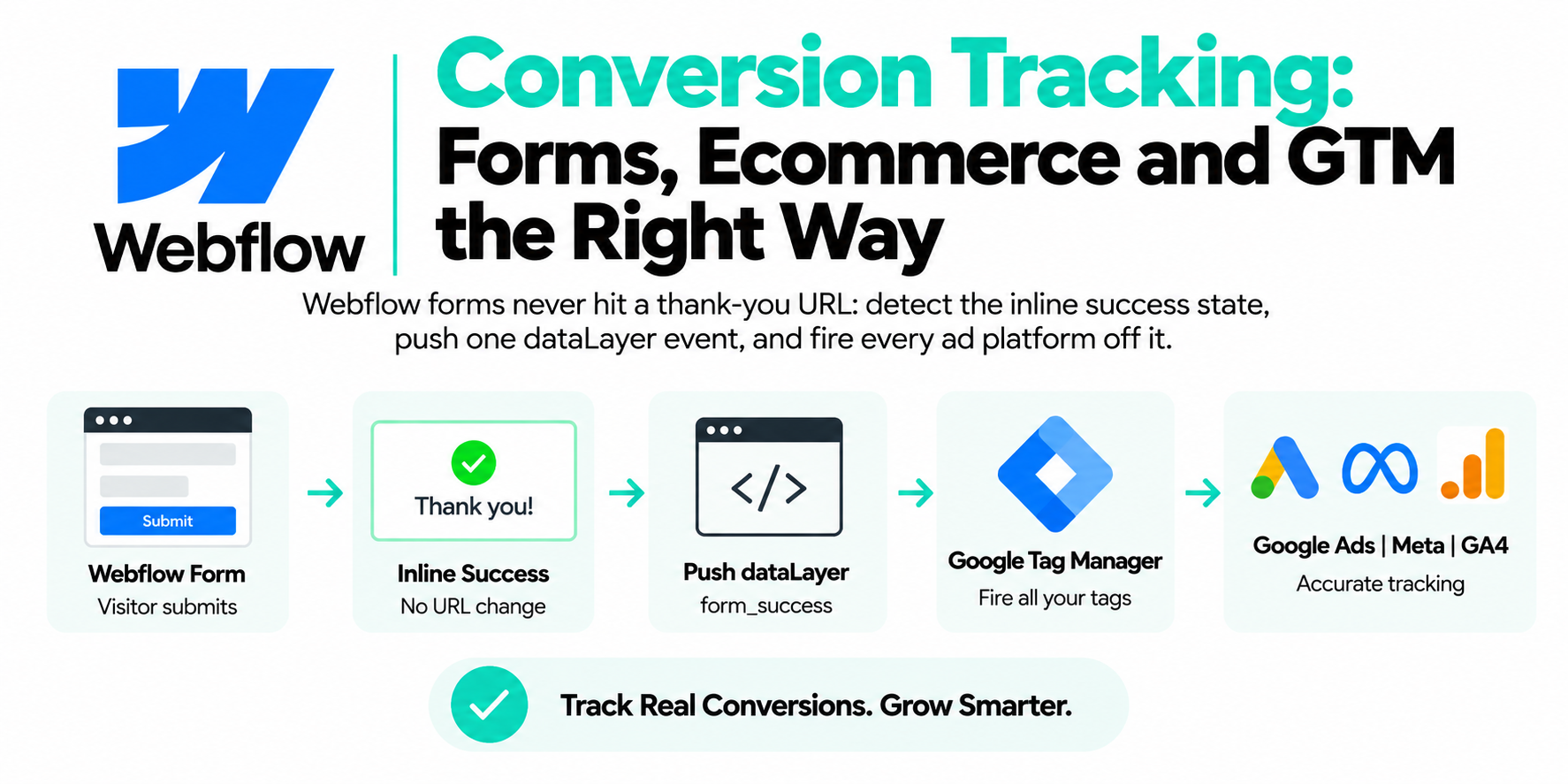
- SPA or AJAX submits with no navigation. The form posts in the background, a success message swaps in via JavaScript, and the thank-you page your trigger was built on never loads.
- Iframed forms. Typeform, Calendly, HubSpot, Jotform embeds all render inside an iframe on a different origin. GTM on your page can't see anything inside it. To your container, the user did nothing.
- Thank-you redirects that never render tags. The form tool redirects to a page where GTM isn't installed, or the redirect moves so fast the conversion tag never finishes its request.
- Generic form_submit triggers miscounting. GTM's built-in Form Submission trigger and GA4's enhanced-measurement form_submit event fire on submit attempts. Failed validation? Still counts. And frameworks that call preventDefault can suppress the native event entirely, so the same trigger undercounts elsewhere.
Diagnose before you fix. Open GTM Preview, submit a test lead, and watch the event stream. Nothing appears when you hit the button? Bucket 1, 2, or 3. An event fires even on an empty form? Bucket 4.

- Visitor submits — Form posts in the background via fetch
- No navigation — No new URL, often no native submit event
- Trigger stays silent — Thank-you pageview trigger never fires
- 40 leads, no data — The leads exist; the ad platforms never hear
- Fire on real success — generate_lead pushed from the success callback
Why do AJAX and single-page-app forms break tracking?
Because the two classic conversion triggers both assume a page navigation, and AJAX forms don't navigate. A thank-you pageview trigger needs a new URL. GTM's Form Submission trigger needs the browser's native submit event. React, Vue, and most modern form builders intercept the submit, call preventDefault, post the data with fetch, and re-render a success state in place. No new URL, often no native submit event your trigger can hear.
Some setups half-work, which is worse. The native submit fires but validation happens afterward, so your trigger counts every attempt, including ones the API rejected. You report more "leads" than the CRM ever received, and Smart Bidding optimizes toward people who abandon forms.
Why can't my tags see Typeform, Calendly, or HubSpot embeds?
Because the browser's same-origin policy walls off the iframe. The embed runs on typeform.com or calendly.com; your GTM container runs on your domain, and can't read the iframe's DOM or attach listeners inside it. Your click, visibility, and form triggers are all blind past that boundary.
The one channel that crosses the wall is postMessage. Serious embed tools post events up to the parent page: Calendly posts calendly.event_scheduled, HubSpot forms post an hsFormCallback message with an onFormSubmitted event name, Typeform's embed SDK gives you an onSubmit callback. That's the hook you build on, not clicks near the iframe. I've seen "clicked near the Typeform" used as a lead conversion; it counted people who opened the first question and left.

| Real success event | Vendor postMessage | Click or form_submit |
|---|---|---|
| Fires only when the tool confirms | calendly.event_scheduled | Counts failed validation as a lead |
| Survives AJAX and SPA rewrites | HubSpot hsFormCallback onFormSubmitted | Counts double- and rage-clicks |
| Pushes generate_lead to the dataLayer | Typeform embed SDK onSubmit | preventDefault can suppress it |
| Carries event_id for CAPI dedup | Check e.origin before you trust it | Blind to anything in an iframe |
What's the right way to fix form tracking?
Work down this list and stop at the first level your form supports.
- A real success event from the form tool. Best case. The tool tells you, in code, that the submission succeeded: an on-success callback, a webhook, or a built-in dataLayer push. Fires only on actual success and survives redesigns.
- The embed's postMessage events. For iframed tools, listen for the messages the vendor documents and translate them into dataLayer events. Nearly as reliable as level 1; the risk is the vendor renaming events, which is rare.
- An element visibility trigger on the success state. If you can't touch code, fire when the "Thanks, we'll be in touch" element becomes visible. Decent, but fragile: a CSS class rename silently kills it.
- Naive click or form_submit triggers. Last resort. I'd rather have no data than this data. Counting button clicks means counting typos, double-clicks, and rage-clicks on a broken form as leads.
Level 1 usually takes one small snippet, placed inside whatever success callback your form gives you:
// Runs ONLY when the form tool confirms success
window.dataLayer = window.dataLayer || [];
window.dataLayer.push({
  event: 'generate_lead',
  form_id: 'contact-main',
  form_location: 'pricing-page',
  event_id: 'lead-' + Date.now() + '-' + Math.random().toString(36).slice(2)
});
Then one Custom Event trigger in GTM on generate_lead, and every conversion tag hangs off it: Google Ads, Meta Pixel, GA4, all firing from the same verified moment. The event_id matters if you also send Meta Conversions API events server-side; pass the same ID in both payloads so Meta deduplicates instead of counting the lead twice.
How do I track Calendly and other booking embeds?
Listen for the booking tool's postMessage events on the parent page and convert them into dataLayer pushes. Booking tools fail silently more than anything else I audit, because the entire funnel happens inside the iframe. There is no thank-you page on your domain. Ever.
For a Calendly inline embed, this listener does the job:
window.addEventListener('message', function (e) {
  if (e.origin.indexOf('calendly.com') > -1 &&
      e.data.event === 'calendly.event_scheduled') {
    window.dataLayer.push({ event: 'booking_confirmed' });
  }
});
Fire your Google Ads and Meta lead tags off booking_confirmed. Calendly emits earlier events too (date and time selected, for one); useful funnel steps, never your conversion. Only the scheduled event means a booked call.
Two more notes. If you link out to a hosted Calendly page instead of embedding, none of this works; use Calendly's redirect setting to a thank-you URL on your domain, or a webhook into a server-side setup. And always check the origin like the snippet does, so a random chat widget can't fire your lead tag.
How do I verify the fix actually works?
Submit a real test lead and follow it end to end: GTM Preview, then Google Ads Diagnostics, then Meta Events Manager's Test Events tab. Then do the failure cases. Empty form. Invalid email. Abandoned booking. Your conversion event should stay silent for all three. Most people only test the happy path, and the happy path was never where form tracking lies to you.
And check count settings. A Google Ads lead conversion should count "one" per click, not "every"; the same person submitting twice is not two leads.
Why do serious lead-gen setups back every form with server-side events?
Because everything in this guide, done perfectly, still depends on a browser cooperating. The success listener fires only if the visitor's browser runs your scripts — and lead-gen audiences are heavy on ad blockers that make sure it doesn't. Embeds change their DOM without notice. Redirects outrun tags. You can wire flawless triggers and still leak leads silently.
The webhook path has none of those failure modes. Your form tool already knows exactly when a real submission happened; a webhook carries that to a first-party server endpoint on your own subdomain, which forwards it to Google and Meta with hashed contact data attached. Nothing to block, nothing to misfire on a failed validation, and match quality browser scripts can't reach. Keep the browser events for speed and behavioral context — but let the server be the layer that guarantees no lead goes uncounted.
Frequently asked questions
Why is Google Ads not recording my form conversions?
Most often the conversion tag depends on a thank-you page that no longer loads, because the form now submits via AJAX or lives in an iframe. Test in GTM Preview; if no event fires on submit, rebuild the trigger on a real success signal from the form tool.
Does GA4 automatically track form submissions?
GA4's enhanced measurement can log a form_submit event, but it fires on submit attempts, not confirmed successes, and misses many iframed and framework-based forms. Push your own event from the form's success callback instead.
How do I track a Typeform embed in Google Tag Manager?
Use Typeform's embed SDK onSubmit callback to push a dataLayer event, then fire your tags from a Custom Event trigger. Click triggers on or around the embed can't see inside the iframe and will count openers as leads.
How do I track Calendly bookings as conversions?
For embedded Calendly, listen for the calendly.event_scheduled postMessage and push a dataLayer event when it arrives. For hosted Calendly pages, use Calendly's redirect setting to send bookers to a thank-you page on your domain.
Why is my form conversion count higher than my actual leads?
Your trigger is counting submit attempts or button clicks, including failed validations and double-clicks. Move the tag to a success-only signal and set the Google Ads conversion to count one per click.
Should I use a thank-you page or an event for form conversions?
An event pushed from the form's success callback is more reliable, because it survives AJAX submits, SPA routing, and redirect changes. A thank-you pageview is fine only when the form genuinely navigates there and the page isn't reachable any other way.