Every week someone sends me the same spreadsheet. Shopify says one number, Meta Ads Manager says a smaller one, GA4 says something in between — three tools, three versions of reality. The symptoms change from store to store. The disease almost never does.
Why is my conversion tracking wrong in the first place?
Because the standard setup runs entirely inside your visitor's browser, and browsers have spent years turning against tracking.
Here's how tracking normally works. You paste a snippet — the Meta Pixel, the Google tag — into your site. When someone buys, that snippet fires a message from their browser to Meta or Google: "Purchase, $89, this person." Every report you look at is built from those little messages. Three things break them:
- Ad blockers. A meaningful share of your visitors run one, and blocking requests to known tracking domains like connect.facebook.net is exactly what they're built for. The sale happens; the message never leaves the browser.
- Apple's privacy features. Safari's Intelligent Tracking Prevention caps cookies set by tracking scripts at seven days, and App Tracking Transparency lets iPhone users opt out entirely. A customer who clicks your ad on Tuesday and buys the next week often looks like a brand-new stranger. The sale gets counted; the ad that caused it gets no credit.
- Timing. The snippet only helps if it loads in time. Fast tab-closes, instant thank-you-page redirects, consent banners that delay scripts — each one is a purchase your reports never see.
Think of it like asking every customer to mail you a postcard on their way out of the store. Some don't bother. Some postcards get intercepted. Meanwhile your register rang every single sale. Browser tracking is the postcards. Your order system is the register. The whole problem is that Google and Meta only ever see the postcards.
And it's worse than a reporting problem. Meta and Google use those conversion messages to decide who sees your ads next. Feed them a partial picture and they optimize toward the wrong people, your cost per purchase creeps up, and you cut budget on campaigns that were quietly working.

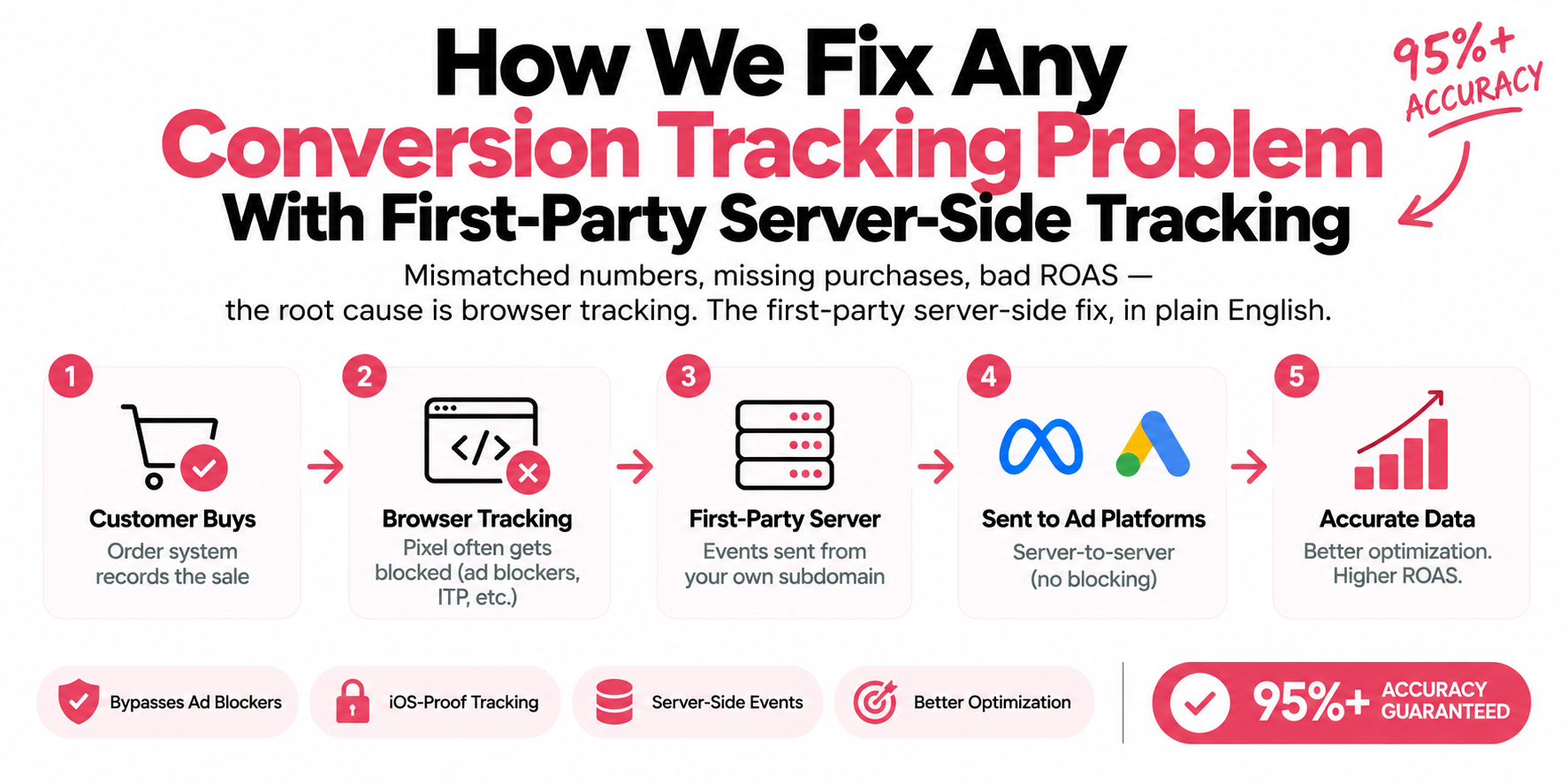
- Customer buys — Your order system records the sale
- Browser fires a pixel — A message to connect.facebook.net
- Ad blocker or ITP — Blocked, or the cookie capped at 7 days
- Platform never hears — A real sale missing from Ads Manager
- Backend sends it — Purchase fires from the order record
What is first-party server-side tracking, in plain English?
It means your conversion data travels through a domain you own to a server you control, and that server — not the visitor's browser — tells Google and Meta what happened. Take the two pieces one at a time.
First-party means the data goes to your own subdomain first — something like track.yourstore.com — instead of straight to a Meta or Google address. Back to the mail analogy: sending data from your website to facebook.com is mail addressed to a stranger, and browsers and ad blockers increasingly refuse to carry it. Sending data to track.yourstore.com is mail to your own mailbox on your own property. Browsers treat it as your site talking to itself, because that's what it is. It doesn't get blocked, and cookies set on your own domain live far longer than ones set by third-party scripts.
Server-side means a small server sits behind that subdomain, receives every event, and passes it along to Google, Meta, TikTok — whoever you advertise with — server to server. No ad blocker sits in that path. No Safari rule applies. Nobody closes a tab too early.
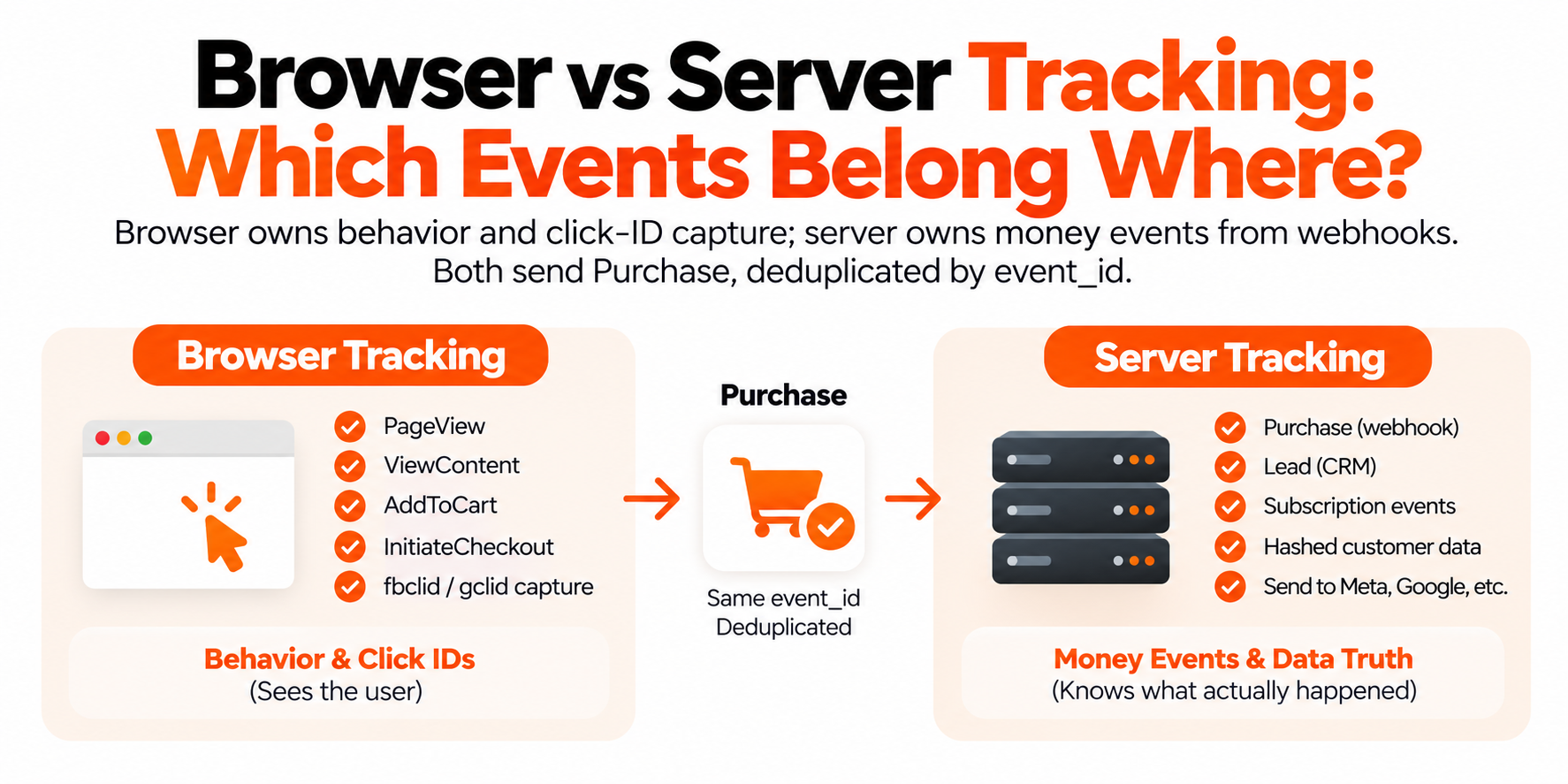
Here's the part that changes everything for accuracy: the server doesn't have to rely on the browser at all for the events that matter. Your store's backend — the system that actually records the order — can send the Purchase event directly. The sale is reported from the source of truth: the order itself. If the money landed, the event fires.
That one architectural change is why the same fix resolves so many symptoms. You recover the conversions ad blockers and iOS were eating. Your first-party cookies survive long enough to connect a purchase back to the ad click that caused it. The extra detail the server can safely attach — order value, a hashed customer email for matching — raises your Event Match Quality on Meta, so the algorithm learns from real buyers instead of a fraction of them. And you stay in control of consent: the server sends exactly what each visitor agreed to under Consent Mode v2, nothing more.

| Layer | What sits there |
|---|---|
| Inputs | Web container in the browser, Shopify or WooCommerce webhook, Form handler on your server, Consent state from your CMP |
| track.yourstore.com | Receives each event once, dedupes on event_id, adds order value and hashed email |
| Destinations | GA4, Meta Conversions API, Google Ads, TikTok |
How does Google Tag Manager fit into this?
Google Tag Manager is the control panel that runs both halves of the setup from one place — the browser half and the server half.
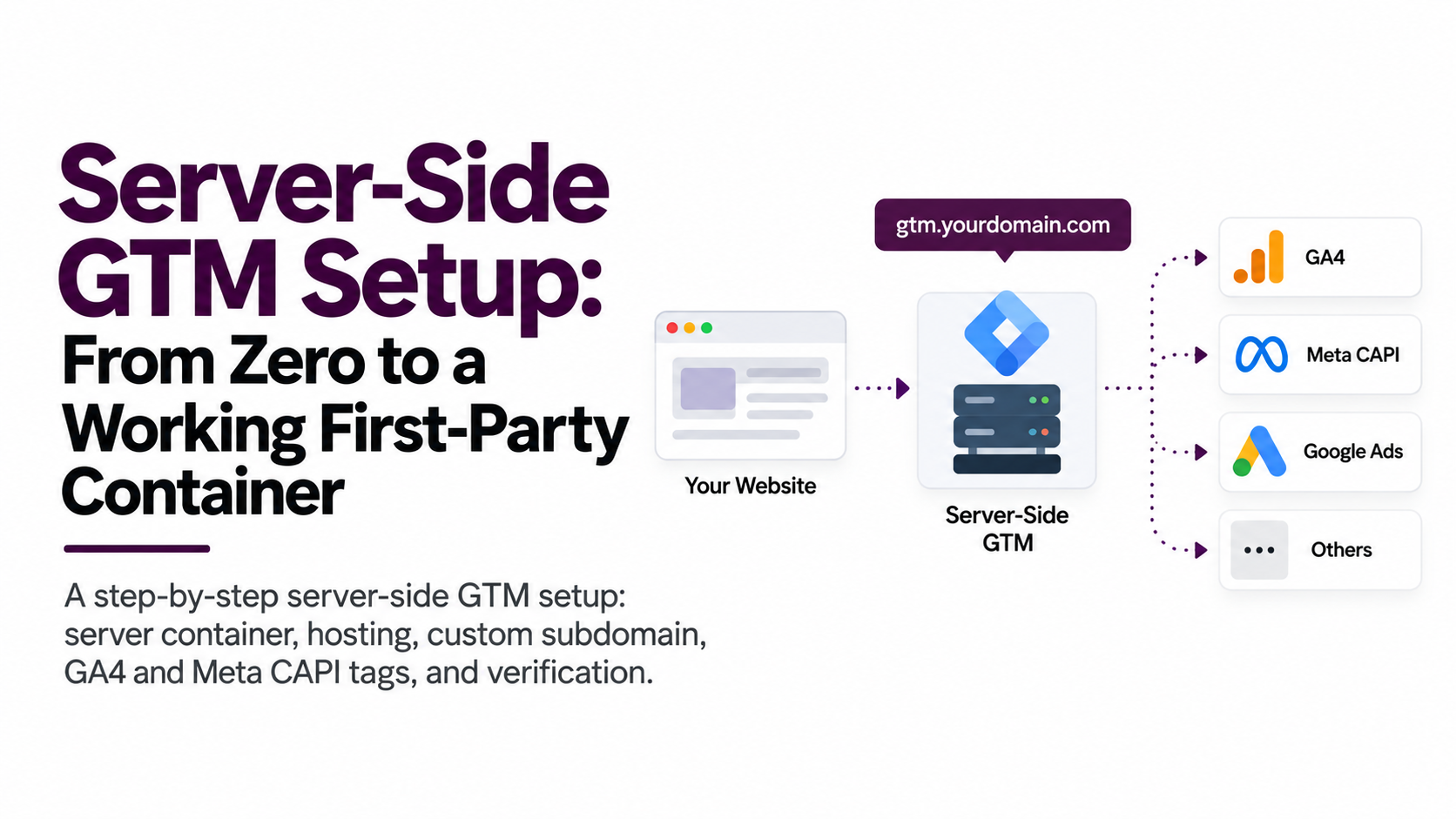
If you haven't worked with it: GTM is a free Google tool that holds all your tracking in one dashboard, so tags don't live as scattered code snippets across your theme. For this architecture it gives you two containers. The web container lives in the browser, like your current setup — but its job shrinks to sending everything to one place: your subdomain. The server container runs on a small cloud server behind track.yourstore.com. It receives each event once, cleans it up, and distributes it to GA4, the Meta Conversions API, Google Ads, TikTok — every platform you use.
One event in, every platform fed the same information. That's why the numbers match afterward. It also means changes happen in one place, and you can watch everything your site sends in a single debug view instead of guessing across five dashboards.

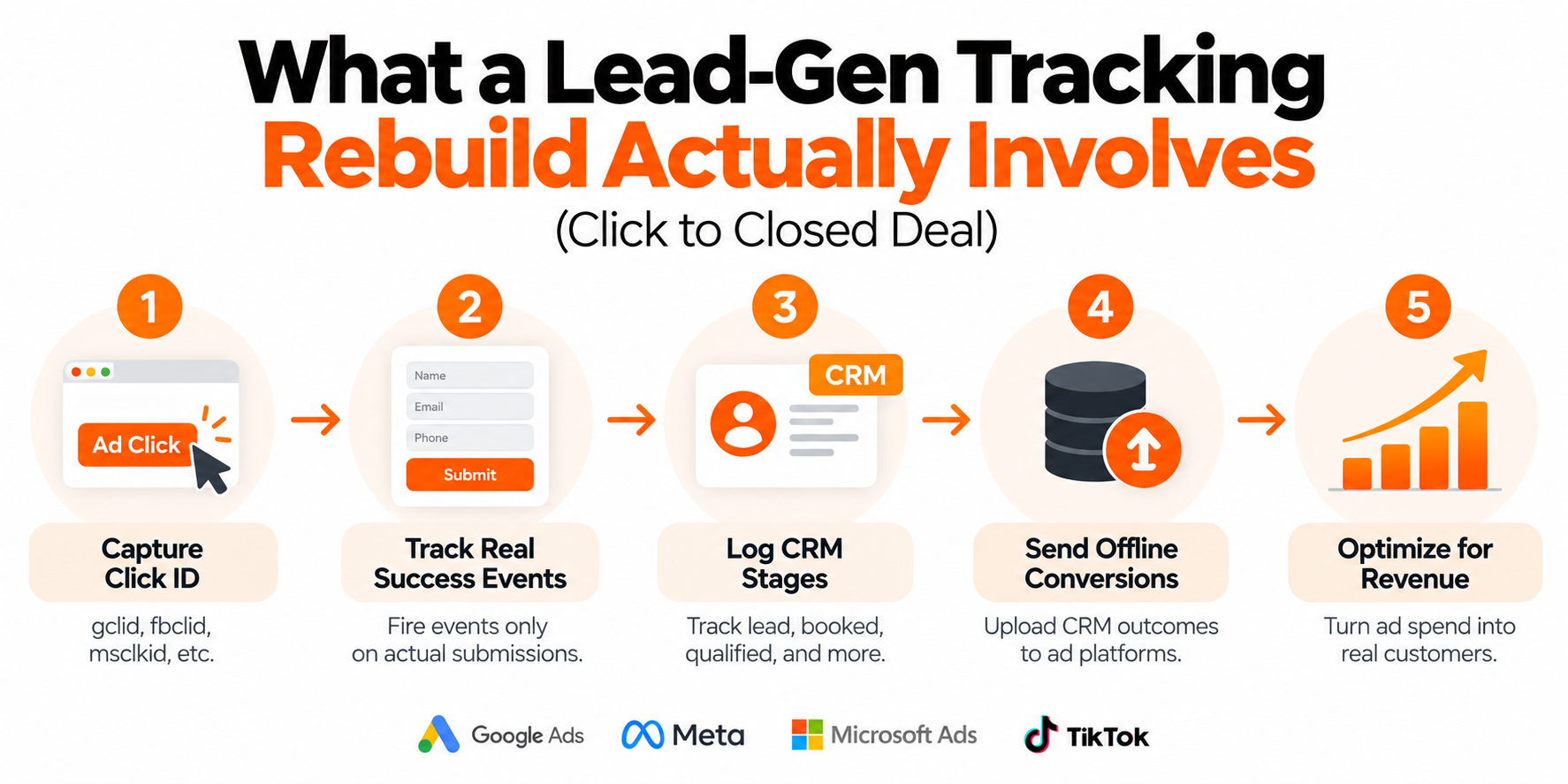
- Audit what's firing now — Map every tag, then compare each platform's count against your backend's real orders
- Stand up a server container — A DNS record for track.yourstore.com with a GTM server container behind it
- Wire money events from the backend — Purchase fires from the Shopify or WooCommerce webhook; leads from the form handler
- Deduplicate on event_id — Browser and server both report on purpose; the shared ID keeps it as one conversion
- Verify against real orders — Compare reported conversions to backend orders day by day — that ratio is your accuracy
What does the fix actually look like, step by step?
Five steps, in a fixed order. This is what we do on every engagement, whatever the platform.
- Audit what's firing now. We map every tag and event on the site and compare what each platform reports against your backend's real orders for the same period. That gap is your baseline accuracy — the thing we're about to fix and measure against later.
- Stand up a server container on your subdomain. We add a DNS record for something like track.yourstore.com, host a GTM server container behind it, and reroute the site's tracking through it. From the browser's point of view, your site is now just talking to itself.
- Wire the money events from the backend. Purchase fires from your store's order system — a Shopify or WooCommerce webhook, for example — not from a script in the buyer's browser. Leads fire from the form handler. Every real order now produces an event, whether or not the browser cooperated.
- Deduplicate. For many events the browser and the server both report, on purpose — each side catches things the other misses. Both copies carry the same event_id, so Meta and GA4 recognize them as one event and keep one. Skip this and you trade undercounting for double-counting.
- Verify against real orders. We run the new setup, compare platform-reported conversions to actual backend orders day by day, and close whatever gaps remain. It's the only way to know your number instead of hoping.
How can we guarantee 95%+ accuracy?
Because after this build, accuracy stops being a feeling and becomes a number you can check.
The math is simple. Your backend knows exactly how many orders or leads happened — money either arrived or it didn't. Count the conversions each platform reports for the same period, divide by the backend's count, and that's your accuracy. No modeling, no attribution philosophy. A ratio.
Setups built this way typically land around 98%. The browser-plus-backend combination with proper dedup catches nearly everything; the small remainder is genuine edge cases, like EEA visitors who decline consent, where Consent Mode v2 rightly limits what can be sent. That's why we can put a floor under it in writing: 95%+ conversion accuracy, guaranteed, verified against your own order data — not against a dashboard we control.
If a tracking provider can't tell you how they'd even measure accuracy, that tells you something.
Which tracking problems does this actually solve?
Nearly all of them, because most tracking problems are the same problem wearing different costumes. The quick map:
| Symptom | How this architecture fixes it |
|---|---|
| Shopify, GA4, and Ads Manager all show different numbers | One server feeds every platform from the same event stream, so they finally count the same things. |
| Purchases missing from Meta or Google Ads | Purchase fires from your backend's order records, so blocked or unloaded browser scripts stop costing you conversions. |
| ROAS looks worse than the bank account says | First-party cookies on your subdomain survive long enough to connect purchases back to the ad clicks that caused them. |
| CPAs creeping up, ads reaching the wrong people | Fuller conversion data with better matching gives the algorithm real buyers to learn from. |
| Form leads never showing up as conversions | Leads fire server-side from the form handler, so instant redirects and slow scripts can't swallow them. |
| Every browser update breaks something | The pipeline runs on your own domain and your own server, so it doesn't care what Chrome or Safari changes next. |
What it doesn't fix: a weak offer, a slow checkout, or ad creative nobody clicks. Tracking makes the truth visible. Acting on it is still your job.
Frequently asked questions
Do I need to be technical to get server-side tracking?
No. On a done-for-you build you approve a DNS record and grant access to your store and ad accounts; the container setup, event wiring, and verification are handled for you.
Do I have to remove my Meta Pixel or Google tag?
No — the browser tags stay. Server events run alongside them, and a shared event_id deduplicates so each conversion is counted once with the best data from both sides.
Does server-side tracking work on Shopify or WooCommerce?
Yes. Any platform that records orders and supports webhooks works — Shopify, WooCommerce, ClickFunnels, GoHighLevel, Kajabi, and BigCommerce are all standard builds.
Is server-side tracking legal under GDPR?
Yes, when it's wired to your consent banner. The server sends only what each visitor consented to under Consent Mode v2 — more control than scattered browser scripts ever gave you.
Will server-side tracking slow down my website?
No — usually the opposite. Work moves off the browser, and you often end up loading fewer third-party scripts on the page.
Is this the same thing as the Meta Conversions API?
The Conversions API is one destination. First-party server-side tracking is the infrastructure that feeds CAPI, GA4, Google Ads, and TikTok from a single deduplicated stream on your own subdomain.
How much does it cost to run a tagging server?
The server container runs on a small cloud instance with a modest monthly hosting fee — a rounding error next to what mis-optimized ad campaigns waste.
How do I check my current tracking accuracy?
Pick last month, count actual orders in your store admin, then compare against Purchase events in Meta Events Manager and conversions in Google Ads for the same window. The gap is your problem, measured.