I audit Google Ads accounts every week where the conversion tag fires perfectly and the account still underreports by a noticeable margin. Safari kills the click cookie, an ad blocker eats the tag, and Google simply never connects the sale back to the click. Enhanced Conversions claws those back, and most setups I open are half-configured or silently broken.

- Click ID cookie dies — Safari ITP caps script cookies at 7 days
- Customer types email — Entered at your checkout, in your dataLayer
- SHA-256 hash sent — Google never sees the raw email address
- Match on Google's side — Same person signed into Chrome, Gmail, YouTube
- Conversion recovered — Real sale attributed; Smart Bidding learns
What does Enhanced Conversions actually do?
Enhanced Conversions sends a hashed version of your customer's own data (email address, phone number, name, home address) along with the conversion event, and Google matches that hash against its signed-in user base to recover conversions it would otherwise lose. That's the whole trick. Normally Google ties a purchase back to an ad click through a click ID stored in a cookie, and cookies get blocked, capped, or deleted constantly: WebKit's ITP caps script-set cookies at 7 days in Safari, ad blockers strip tags outright, users clear storage.
But the person who bought from you typed their email into your checkout, and Google knows that email too, because the same person is signed into Chrome, Gmail, or YouTube. Hash it with SHA-256 on both sides, compare hashes, and you have a match that doesn't depend on any cookie surviving. Google never sees the raw email; you never see anything about the user. One-way comparison.
The result: invisible conversions get attributed, reported CPA gets closer to reality, and Smart Bidding trains on more complete data. It doesn't create new conversions. It recovers real ones you already earned.

| Enhanced Conv: Web | Enhanced Conv: Leads |
|---|---|
| Sale completes on your site | Form fill closes weeks later |
| Hashed data rides the on-site tag | Hashed email caught at form submit |
| Upgrades your conversion action | Replaces gclid offline imports |
| Shopify, WooCommerce, BigCommerce | Agencies, home services, B2B |
Enhanced Conversions for Web vs for Leads: which one do I need?
Enhanced Conversions for Web is for conversions that happen on your website; Enhanced Conversions for Leads is for sales that close later, offline. Pick based on where the money actually changes hands.
| Enhanced Conversions for Web | Enhanced Conversions for Leads | |
|---|---|---|
| Use when | The purchase or signup completes on-site (ecommerce checkout, paid subscription, booked appointment) | A form fill becomes a customer days or weeks later, over the phone or in your CRM |
| What's sent | Hashed user data attached to the on-site conversion tag at fire time | Hashed email/phone captured at form submit, then used later to import the offline sale |
| Replaces | Nothing; it upgrades your existing conversion action | GCLID-based offline conversion imports (no more storing click IDs in your CRM) |
| Typical fit | Shopify, WooCommerce, BigCommerce stores | Lead gen: agencies, home services, B2B, GoHighLevel and ClickFunnels funnels |
They're not mutually exclusive. A store with a quote form should run Web on the purchase action and Leads on the form action. If your sales close in a CRM, Leads is the difference between optimizing for form fills and optimizing for revenue.
What's the best way to set up Enhanced Conversions?
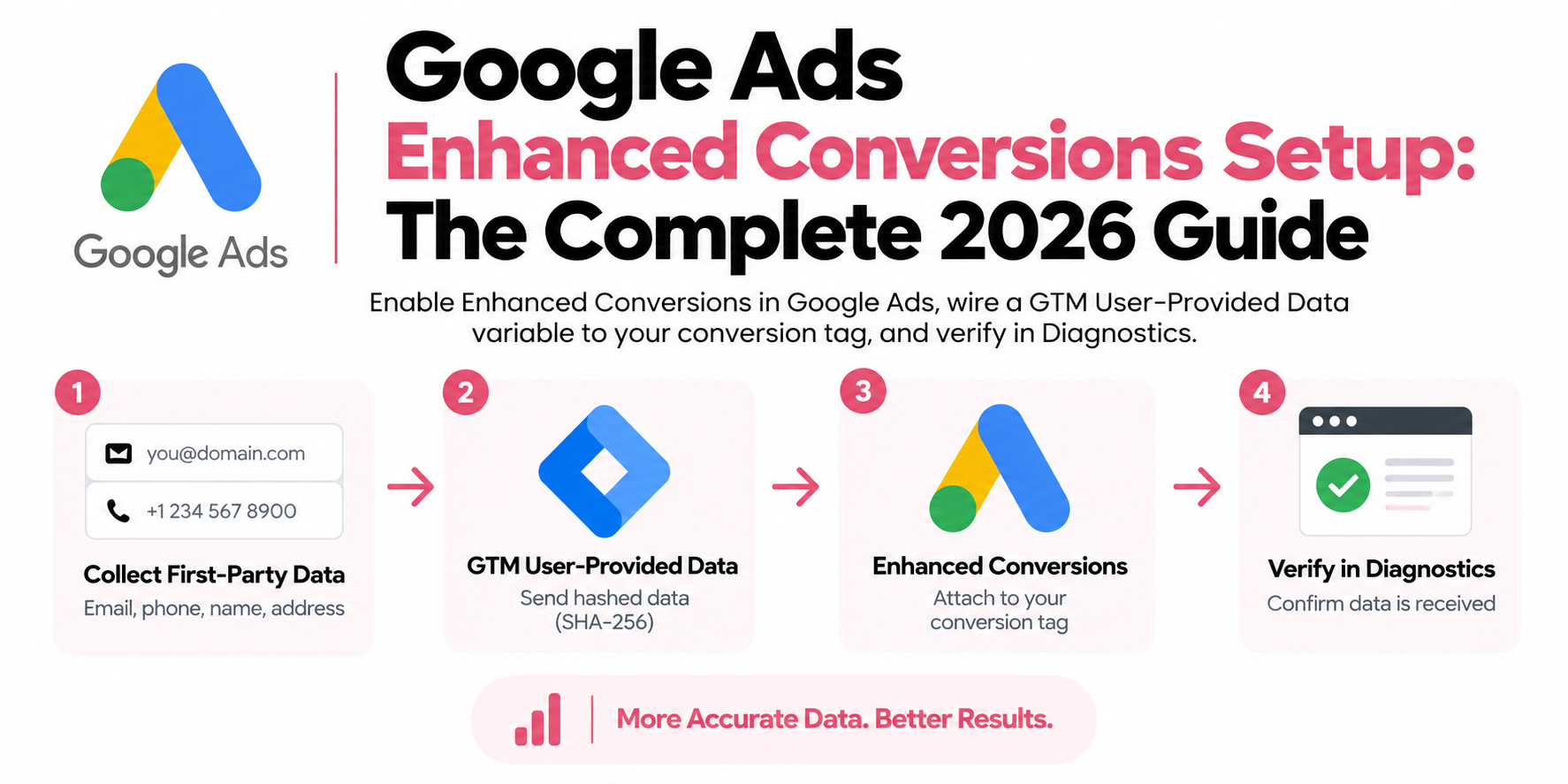
Three paths, ranked the same for almost every client: GTM user-provided data variable first, Google tag second, API last. GTM gives you control and debuggability without touching theme code.
Path 1: GTM user-provided data variable (recommended)
- In Google Ads, go to Goals → Conversions, open your conversion action, expand Enhanced conversions, turn it on, and pick Google Tag Manager as the method. Accept the customer data terms if prompted.
- In your GTM web container, create a new variable of type User-Provided Data.
- Choose how it collects data. Manual configuration is what I use on nearly every build: point each field (email, phone, name, address) at a dataLayer variable your site pushes, for example
customer.emailon the order confirmation page. Automatic collection scrapes the DOM for likely fields; fine for a quick test, fragile in production. Code returns the object from a Custom JavaScript variable if your data needs assembly. - Open your Google Ads conversion tracking tag, check Include user-provided data from your website, and select the variable you just made.
- Preview in GTM: fire a test conversion and confirm the variable resolves to an actual email at the moment the tag fires, not
undefined. - Publish, then watch the Diagnostics tab over the following days.
If your platform doesn't expose customer data in the dataLayer, that's the real project. On Shopify, the Customer Events pixel gives you checkout data to push; on WooCommerce and WordPress it's a small snippet on the thank-you page template. Get the dataLayer push right and everything downstream is configuration.
Path 2: the Google tag
If you run gtag.js directly without GTM, enable enhanced conversions in the Google tag settings and either let automatic detection find the fields or pass them explicitly in user_data. It works, but every change means editing site code, and automatic detection breaks the day your checkout template changes. I move these accounts to GTM when I inherit them.
Path 3: the Google Ads API
The API uploads enhanced conversion data server-to-server. Right answer for big engineering teams and for Enhanced Conversions for Leads at scale; overkill as a starting point for everyone else. Server-side GTM gets you most of the same benefit with far less build.
What do people get wrong with Enhanced Conversions?
Four things, over and over.
The data isn't on the page when the tag fires
This is the big one. Your conversion tag fires on the thank-you page, but the email was typed two steps earlier at checkout and the thank-you page doesn't render it anywhere the variable can reach. The tag fires with empty user data. No error. Nothing red in GTM.
Fix it one of two ways: have the platform push customer data into the dataLayer on the confirmation page (best), or capture the email at checkout and store it in sessionStorage or a first-party cookie so a variable can read it back at fire time. Preview mode is your test: when the conversion tag fires, the User-Provided Data variable must show a real value.
Formatting and normalization mistakes
Google expects normalized input before hashing: emails lowercased with whitespace trimmed, phone numbers in E.164 format (plus sign, country code, digits, so +14155551234, no spaces or dashes). Pass plain text through the GTM user-provided data variable and Google normalizes and hashes for you, which is exactly why I recommend that path. Where teams shoot themselves in the foot is pre-hashing: they SHA-256 " John@Example.COM " with the capitals and stray space intact, and the hash matches nothing, ever.
Ignoring consent in the EU
Since Consent Mode v2 became enforced for the EEA, sending user data to Google Ads requires ad_user_data consent. If the user denies it, enhanced conversion data doesn't get sent, full stop, and that's correct behavior. What you control is the wiring: a CMP that actually updates consent state so consented users' data flows cleanly. What I regularly find instead is a banner that blocks GTM entirely or never grants ad_user_data at all, which quietly zeroes out enhanced conversions for all of Europe.
Expecting instant verification
Each conversion action has a Diagnostics tab in Google Ads. Expect a few days before it reports on your implementation, and weeks before the impact on reported conversions is measurable. Teams panic on day two and rip out a working setup. Don't. Verify in GTM Preview that real data reaches the tag, then check Diagnostics the following week. "Recording enhanced conversions" is the status you're waiting for.

| Layer | What sits there |
|---|---|
| Inputs | Backend order record, Web container events, Shopify Customer Events |
| track.yourstore.com | Attaches the email from your order record, normalizes it, enforces consent once |
| Destinations | Google Ads Enhanced Conv., GA4, Meta CAPI |
Do I need server-side tracking for Enhanced Conversions?
You don't need it to start, but it's the upgrade that fixes the failure modes this article keeps tripping over. Plain language first: server-side tracking means your tags don't run only in the visitor's browser. Events go to a server container you own, on your own subdomain (something like track.yourstore.com), and that server forwards clean data to Google Ads, GA4, Meta, wherever. The browser does less; your server does more.
For Enhanced Conversions specifically, that changes three things. First, the "data must be on the page at fire time" problem mostly disappears, because the server can attach the email from your backend order record instead of scraping whatever the thank-you page happens to render. Backend data is complete and correctly formatted every time; DOM scraping is neither. Second, ad blockers and Safari's ITP hit browser tags hard, and a first-party endpoint on your own subdomain is far more resistant, so the conversion event itself survives to be enhanced at all. An enhanced conversion setup on a tag that never fires recovers nothing. Third, one server pipeline feeds every platform from the same source of truth, so Google Ads, GA4, and Meta CAPI stop telling you three different stories about yesterday, and consent is enforced in one place instead of five tags deep.
Browser-side Enhanced Conversions is a patch on a leaky pipe; first-party server-side is the new pipe. Our setups typically land around ~98% conversion accuracy measured against actual orders.
Frequently asked questions
Does Enhanced Conversions violate GDPR?
It can be run compliantly: data is SHA-256 hashed before transmission, and with Consent Mode v2 wired correctly it's only sent when the user grants ad_user_data consent. You still need a proper legal basis and a working CMP.
Do I need to hash the email myself before sending it to Google?
No. If you use the GTM user-provided data variable or the Google tag, you can pass plain text and Google normalizes and hashes it with SHA-256 before it leaves the browser. Only pre-hash if you're comfortable normalizing exactly to spec first.
How long does it take for Enhanced Conversions to be verified?
Expect a few days before the Diagnostics tab reports on your implementation, and weeks before the impact is judgeable. Verify immediately in GTM Preview instead: the variable must contain real values when the conversion tag fires.
Can I use Enhanced Conversions with only a phone number?
Yes. Email is the strongest identifier, but phone (E.164 format) works, and name plus home address is also accepted. More fields generally mean better match rates.
What's the difference between Enhanced Conversions and Consent Mode?
Enhanced Conversions recovers attribution using hashed first-party data; Consent Mode governs what Google tags may send based on consent and lets Google model the gaps. In the EEA you need Consent Mode v2 for Enhanced Conversions data to be sent at all.
Does Enhanced Conversions work without GTM?
Yes, via the Google tag (gtag.js) directly on your site or via the Google Ads API. GTM is still the setup I recommend because you can change the data mapping, test in Preview mode, and debug without editing site code.
Will Enhanced Conversions inflate my conversion numbers?
No. It attributes real conversions that cookie loss would have hidden. Reported conversions usually rise after enabling it because you're finally seeing sales that were always happening.