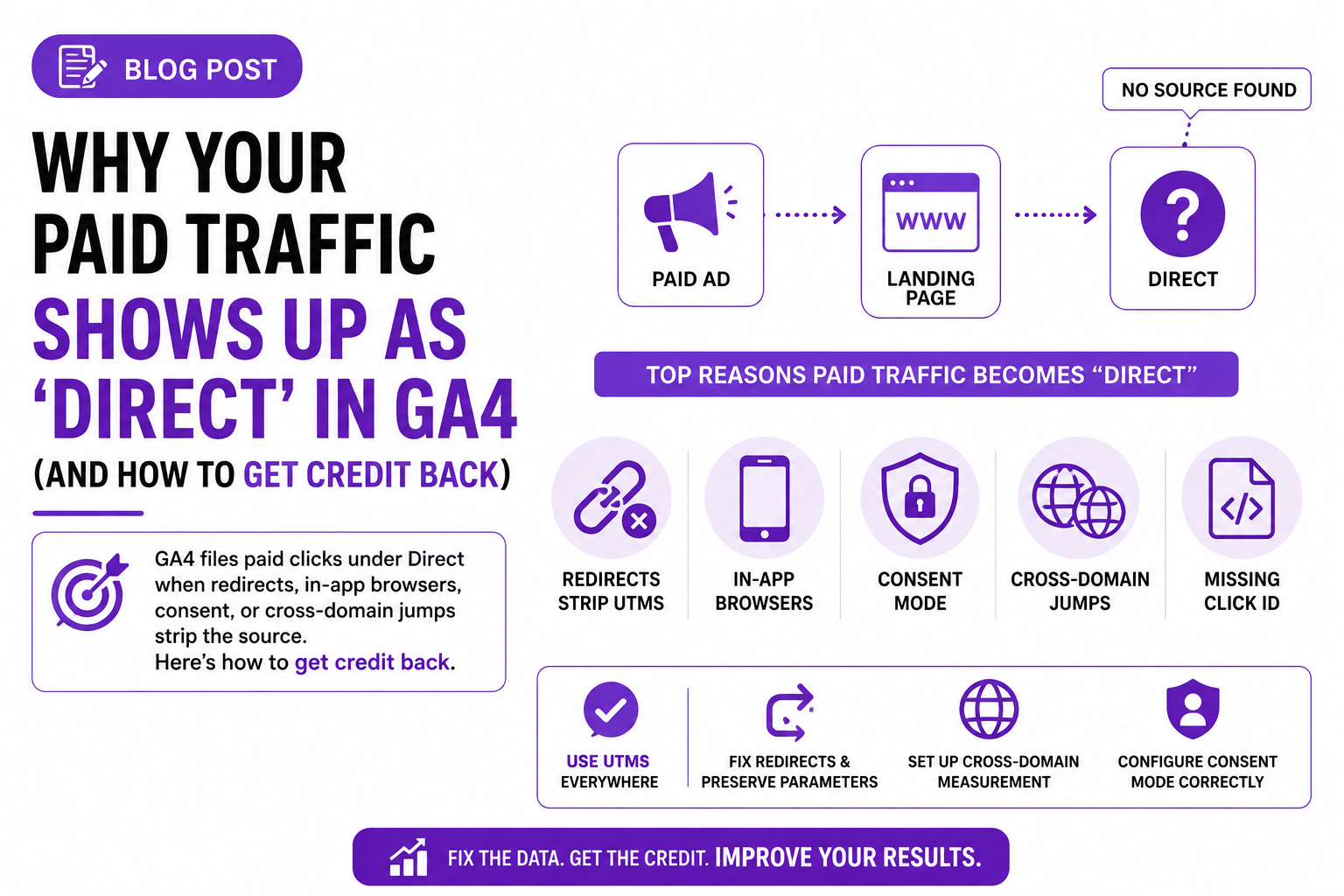
You're spending real money on Google and Meta ads. The clicks show up in Ads Manager. But in GA4, "Direct" keeps growing while your paid channels look flat. I've audited this pattern on dozens of accounts. It's almost never one cause — it's four or five small leaks, each eating a slice of your attribution.

- Ad click — gclid and UTMs are on the landing URL
- Redirect hop — https or geo rewrite drops the query string
- In-app browser jump — Open in Safari: no referrer, no parameters
- GA4 has nothing — No UTMs, no click ID, no referrer: Direct
- First-party capture — Click ID stored on your domain at landing
What does GA4 actually mean by "Direct" traffic?
Direct is GA4's shrug. It's not a channel, it's the absence of one: the session arrived with no UTM parameters, no click ID like gclid or fbclid, and no HTTP referrer, so GA4 had nothing to classify. Some of it really is people typing your URL. But a big chunk is traffic that had a source and lost it between the click and your GA4 tag firing. Check the session-level session_source / medium dimensions to see the raw damage.
Are redirects or link shorteners stripping your UTM parameters?
Yes, this is the most common leak I find. Any redirect between the ad click and your landing page is a chance for the query string to get dropped. The usual suspects:
- http to https and non-www to www redirects that rebuild the URL without carrying the query string forward.
- Vanity URLs and link shorteners (bit.ly, a /promo path that 301s to the real page) saved without the UTMs on the destination.
- Geo or language redirects that bounce users to /en/ or a country domain and drop everything after the
?. - Trailing-slash rewrites in Apache or Nginx rules written years ago by someone who never thought about tracking.
The test takes two minutes. Paste your actual ad final URL, full parameter string attached, into a browser and watch the address bar. If utm_source or gclid is gone when the page settles, you found your leak.
Do in-app browsers on Facebook and Instagram lose attribution?
They can, and it's sneakier than a redirect. Tap an ad inside the Facebook or Instagram app and the page opens in Meta's in-app browser, where the fbclid usually survives. The problem is the handoff: when the user taps "Open in Safari," that jump often arrives with no referrer and no parameters. New browser, new session, no source. Direct.
Links from TikTok, LinkedIn, and email-app webviews behave the same way. You can't eliminate it, but don't force browser-switch prompts, and put full UTMs on every Meta ad so at least the initial in-app pageview gets attributed.
Is Consent Mode sending your paid sessions to Direct?
For EEA and UK traffic, very likely some of them. Under Consent Mode v2, a visitor who declines analytics cookies sends GA4 cookieless pings instead of a normal session with a persistent client ID, so GA4 can't stitch the ad click to the session. Google backfills some of it with behavioral and conversion modeling once your property meets its data thresholds, but modeling never recovers everything.
The practical read: if Direct runs noticeably higher for European traffic than US traffic, consent is part of your story. Check that split before blaming your redirects.
Is your cross-domain funnel resetting the session?
If your funnel crosses domains — a ClickFunnels page to your Shopify store, say — every boundary is an attribution cliff. GA4 needs the _gl linker parameter passed across so the second domain continues the same session. Without it, the second domain starts fresh: a self-referral if the referrer survives, Direct if it doesn't. Your paid click loses credit at the exact step where the purchase happens.
Set it up under Admin, Data streams, your web stream, Configure tag settings, Configure your domains, and add every domain in the funnel. Then click through your own funnel and confirm ?_gl= appears in the URL as you cross domains. If it doesn't, a JavaScript redirect or form POST is bypassing the linker.
Are server-side redirects eating your gclid and fbclid?
Losing click IDs hurts twice. A redirect that drops gclid doesn't just cost you GA4 attribution — it can break Google Ads conversion tracking on that click, since auto-tagging is how Ads ties the conversion back to the keyword. Same for fbclid and the _fbc cookie your Meta Pixel and CAPI setup depend on. One overzealous "clean URLs" rewrite rule can quietly damage Google Ads, Meta, and GA4 at once.
Audit with curl so you see what browsers hide:
curl -sIL "https://yoursite.com/landing?gclid=TEST123&utm_source=google&utm_medium=cpc" | grep -i locationEvery location: header in that chain should still contain your parameters. The hop where TEST123 disappears is the rule you need to fix.

| People typing your URL | AI-referred buyers |
|---|---|
| Land on the homepage | Land on deep pages and blog posts |
| Skew toward returning users | Mostly new users |
| Convert around site average | Convert above site average |
| Arrive pre-sold from ChatGPT or Gemini |
Why is ChatGPT traffic showing up as Direct?
Because AI-assistant traffic is the new dark social. Clicks inside the ChatGPT web app often pass a chatgpt.com referrer, which GA4 files under Referral. But clicks from the desktop and mobile apps, and URLs people copy out of an AI answer and paste into a browser, arrive completely clean. No referrer, no parameters. GA4 calls that Direct.
Buyers now ask ChatGPT, Perplexity, or Gemini to compare products, then visit the winner. Those visitors don't act like true direct traffic: they land on deep pages instead of the homepage, they're mostly new users, and they convert well because they arrive pre-sold. Direct traffic that lands on blog posts and converts above site average is AI-referred buyers, not people typing URLs from memory.
Two ways to spot it. Segment Direct sessions by landing page and flag anything nobody would realistically type. Then build a custom channel group (Admin, Data settings, Channel groups) with an "AI referral" channel matching sources like chatgpt.com, perplexity.ai, gemini.google.com, and copilot.microsoft.com. That won't recover the clean clicks, but it pulls visible AI traffic out of Referral so you can size the trend.

- Tag every paid URL with full UTMs — utm_source, utm_medium and utm_campaign on every ad, on every platform
- Lowercase your UTM convention — GA4 is case-sensitive, so Facebook and facebook become two separate sources
- Run the curl redirect audit — curl -sIL your ad URL and check every location header still carries the parameters
- Configure cross-domain tracking — Add every funnel domain, then confirm ?_gl= appears as you cross the boundary
- Build the AI referral channel — Match chatgpt.com, perplexity.ai, gemini.google.com and copilot.microsoft.com
- Recheck monthly — One deploy can reopen a leak you already fixed, so make it a recurring check
How do you get attribution credit back?
Work the list in order. Each step is boring. Together they move a meaningful chunk of Direct back into paid channels.
- Tag every paid URL with full UTMs.
utm_source,utm_medium,utm_campaignon every ad, every platform. UTMs survive some situations where click IDs and referrers don't. - Write a UTM convention and enforce it. Lowercase everything (GA4 is case-sensitive, so "Facebook" and "facebook" become two sources), fixed values for source and medium, one shared template.
- Run the redirect audit. The curl check above, on every ad final URL and vanity link. Fix rewrite rules so they preserve query strings.
- Configure cross-domain tracking for every domain in the funnel, then verify the
_glparameter passes. - Build the AI referral channel group and watch landing-page patterns in whatever Direct remains.
- Recheck monthly. One deploy can reopen a leak you already fixed.
Can a first-party server setup stop the Direct leakage for good?
It closes the two leaks that config fixes can't reach. First: click IDs die in transit — redirects strip them, consent delays drop them, in-app browsers lose them. A server-side setup captures gclid and fbclid the instant someone lands and stores them in a first-party cookie on your domain, so attribution survives whatever happens to the URL afterward. Second: Safari's ITP caps script-set cookies at days, which is why your returning buyers keep showing up as Direct. Cookies set server-side from your own subdomain keep the original source alive for the weeks a real consideration cycle takes.
Pair that with the UTM hygiene above and Direct shrinks back to what it should be: people who actually typed your URL. Everything else gets credited to the channel that earned it — which is the whole point of paying for traffic.
Frequently asked questions
Why is GA4 showing my paid traffic as direct?
The session arrived without UTMs, a click ID, or a referrer. Usual causes: redirects that strip query parameters, in-app browser handoffs, consent-declined sessions, and cross-domain session resets.
How do I check if a redirect is stripping my UTM parameters?
Paste your full ad URL with parameters into a browser and see whether they survive on the final page, or run curl -sIL and inspect each location header in the redirect chain.
Does GA4 count ChatGPT traffic as direct?
Sometimes. The ChatGPT web app usually passes a chatgpt.com referrer (Referral), but desktop and mobile app clicks and copy-pasted links arrive with no referrer, so they land in Direct.
Can consent mode cause direct traffic in GA4?
Yes. When EEA visitors decline analytics cookies under Consent Mode v2, GA4 gets cookieless pings and often can't tie the session to its source, so unmodeled sessions land in Direct or Unassigned.
Why did my gclid disappear from the URL?
A server-side redirect (https upgrade, www rewrite, geo redirect, or trailing-slash rule) rebuilt the URL without the query string. Fix the rewrite rule to carry parameters through every hop.
How do I track AI traffic from ChatGPT and Perplexity in GA4?
Create a custom channel group with an AI referral channel matching sources such as chatgpt.com, perplexity.ai, gemini.google.com, and copilot.microsoft.com. It captures the visible share and helps you estimate what's hiding in Direct.